
Managing Duplicates
No two profiles in an organization can share a primary phone number, but more than one profile can have the same email address. A form submission still creates a new profile when its phone number and email match no primary value in the organization. The Duplicates page helps you find and merge these profiles.
Accessing the Duplicates Management Page
Go to People, click the "..." (ellipsis) menu at the top right of the People list, and choose Duplicates. The Duplicates item needs the 'Merge People' permission in the scope you are logged into, such as a chapter. The 'Ignore' buttons and the reference file need 'Merge People' for the whole organization.
The page lists groups of active profiles that share an email address, a full name, or a phone number. A profile also shows a link in its 'Potential Duplicates' field, in the 'Admin' box, when the system finds potential duplicates for that person.
Reference CSV for Smarter Merging
With 'Merge People' for the whole organization, you can click "Upload or manage reference file" to upload a CSV of trusted contact information. The merge window then marks the values that match it and recommends a primary profile. The organization has one file, so delete the current file before you upload a new one.
Merging Duplicate Profiles
Click "Merge" on a duplicate group to open the 'Merge Duplicate Accounts' modal. It shows each profile's contact information and details.
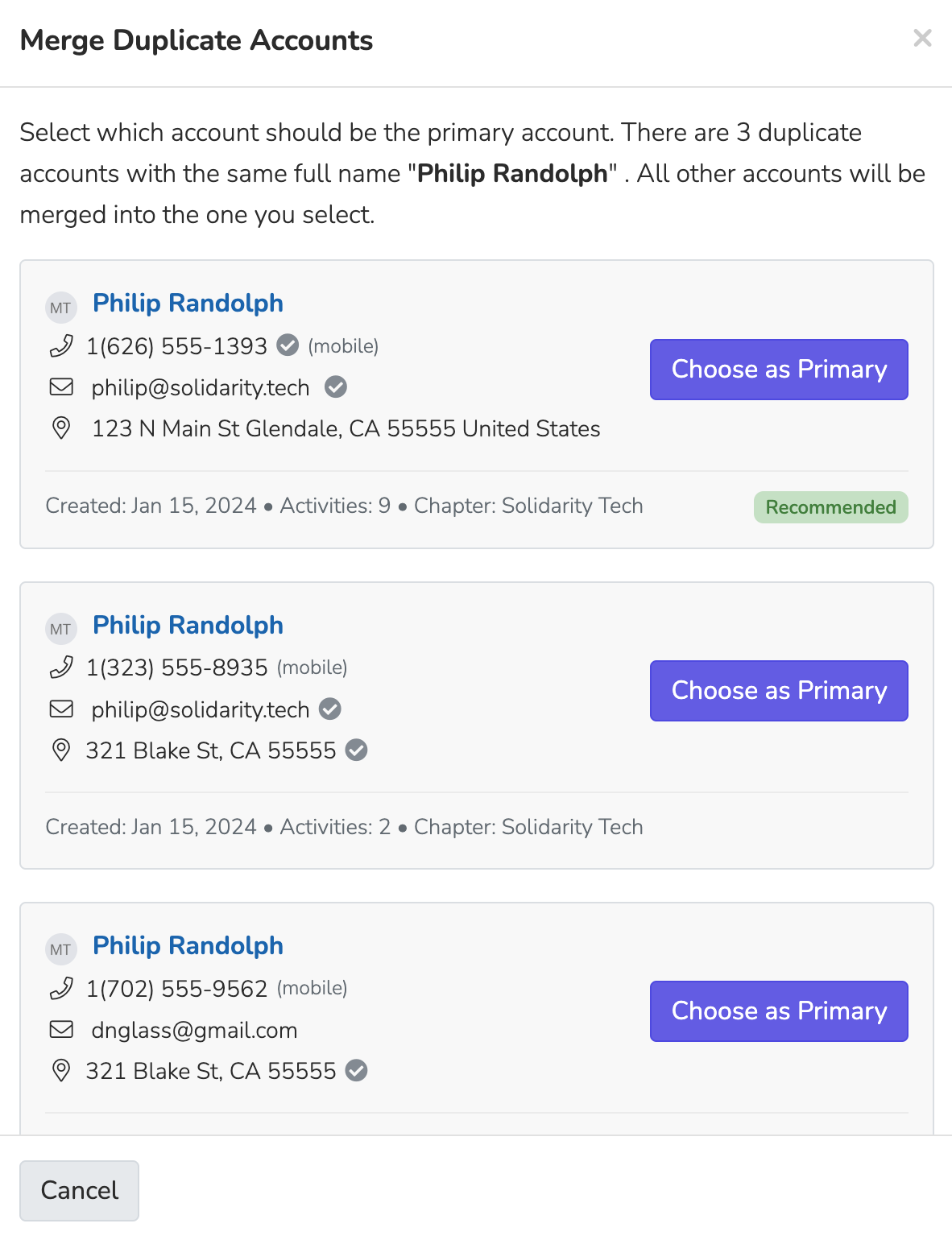
Click "Choose as Primary" for the profile you want to keep. The other profiles merge into it. A merge cannot be undone, so review all profile information before you merge.
Updated 19 days ago