
Websites
Solidarity Tech allows you to create Websites on which you can host your Pages. Websites are highly configurable, and you can easily connect them to your own subdomain or root domain.
Solidarity Tech allows you to create Websites on which you can host your Pages. Websites are highly configurable, and you can easily connect them to your own subdomain (eg. act.drivers-union.org) or root domain (eg. drivers-union.org). At the Website level, you can configure many settings, including the navigation bar and footer to be used on each Page.
Organizations can choose to use the Website as their primary website, or simply as a secondary site where your Solidarity Tech pages are hosted.
Multiple Websites
Organizations on the Standard plan or higher can create multiple websites. This is useful when you need:
- Different branding for different chapters - Each local chapter can have its own website with unique colors, logos, and themes
- Campaign-specific microsites - Spin up dedicated websites for specific campaigns or initiatives
- Separate domains - Connect each website to its own custom domain
Each website has its own theme, navigation, footer, and settings - completely independent from your other websites.
Creating a New Website
To create a new website:
- Navigate to Websites in the sidebar
- Click All Websites (at the top of the websites list)
- Click Create New Website
- Configure your website's name, theme, and settings
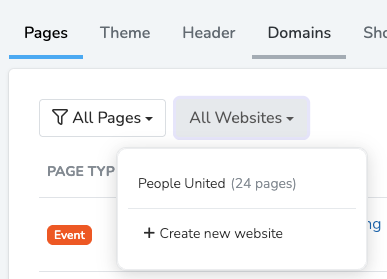
Once created, you can customize the website's colors and branding, navigation and footer, and connect a custom domain.
Settings
The following settings are configurable from the Website's Settings tab.
Home Page: The page displayed at the root of your website's URL (eg. my-org.solidarity.tech).
Default Form: When you create a new page with a form, it uses this page's form as a starting template with all its fields and settings.
Default Landing Page Navigation: When you create a new landing page, it copies the navigation bar from this page. Saves time when all your pages share similar navigation.
Google Analytics: Add your Google Analytics tag in the format G-XXXXXXX to track visitors across your website.
Favicon: The small image shown in browser tabs. Must be 32 by 32 pixels.
Site-wide HTML Head Content: HTML or scripts placed above the closing </head> element on every page. Useful for custom fonts, meta tags, or tracking pixels. See Custom Code Injection for detailed instructions and examples.
Cookie Consent Banner: Show a GDPR/CCPA compliant banner letting users accept or reject cookies. When enabled, you can also add Scripts After Cookie Acceptance, which is code that only runs after users consent (for tracking scripts that require permission). See Custom Code Injection for more on this.
Social Media: Configure which social media accounts to display on your website. You can either inherit from the parent chapter or organization, or set custom values. Supported platforms: Instagram, Facebook, X (Twitter), TikTok, Threads, BlueSky, YouTube, and Mastodon.
Website Scope & Restrictions
Website Scope: Controls which team members can view and edit the website. Websites created at the root organization level are available to all chapters. Websites created at a chapter scope are only available to that chapter.
Restrict to This Scope Only: When enabled, the website will only be available to users at that scope or a parent scope. Users at child scopes (like chapters under an organization) will not see this website when creating new pages, selecting a website for an event page, or browsing the websites list.
This is useful when a parent organization has websites that should not be used by chapters, for example a website designated for organization-wide campaigns only.
Guaranteed availability: The system ensures that every scope always has access to at least one website. If restricting a website would leave a child scope with zero available websites, the system will still provide that scope with one fallback website (the earliest created website accessible to that scope). This prevents a situation where a user cannot create pages because all websites have been restricted away from their scope.
Import Blog Posts
If you're migrating from WordPress or Squarespace, you can import your existing blog posts directly into your website. The importer accepts a standard WordPress XML export file (WXR format). Squarespace sites export in this same format, so it works for both platforms.
How to Export
From WordPress: Go to Tools > Export > select Posts > Download Export File.
From Squarespace: Go to Settings > Advanced > Import / Export > click Export and choose WordPress.
How to Import
- Go to your Website's Settings tab
- Click Import from WordPress in the Import Content section
- Upload your XML file and click Next: Select Posts
- Toggle the posts you want to import (use Select All to check everything)
- Click Import Selected
The import runs in the background. Each post is created as a Blog Post page using the page builder format, with navigation, header, text, and footer sections matching your website's defaults.
The importer preserves original publication dates, tags, excerpts, and URL slugs. Featured images and inline images are automatically downloaded and re-hosted. HTML content is cleaned up for compatibility with the text editor. If a URL slug already exists, a number is appended to keep it unique.
Push Notifications
Send instant notifications directly to supporters' devices. The Push Notifications tab lets you view subscribers and send push blasts to your audience.
Collect subscriptions through:
- Landing page popups with the Push Ask content type
- Thank you page prompts after form submissions
- Navigation or footer buttons on any page
See Push Notifications for complete details on collecting subscriptions and sending push blasts.
Shortlinks
Create custom short URLs that redirect to any destination—perfect for print materials, social media bios, or anywhere you need a memorable link.
To create a shortlink, go to the Shortlinks tab and click Add Shortlink. You'll choose:
- Domain: Use
sldr.it(a global short domain), your Solidarity Tech subdomain, or any custom domain connected to your website - Slug: The path after
/s/(e.g.,sldr.it/s/my-campaign) - Destination URL: Where visitors will be redirected
Each shortlink automatically tracks visits (bot traffic filtered out) and includes a QR code with your website's logo that you can download for print materials.
From the shortlinks table you can copy the link, view/download the QR code, edit the destination, or temporarily disable a shortlink without deleting it.
Updated 6 months ago