
Merge Tags
Merge tags are variables that you include in text-based content (emails, texts, pages) which get replaced with real values when the message is sent. For example, {{ user.first-name }} becomes Joe when sent to a Person named Joe.
You can use Merge Tags in text messages, emails, and Pages throughout Solidarity Tech. Merge Tags use the Liquid templating language for additional formatting options.
All text editors in the dashboard show you the available Merge Tags for that context:
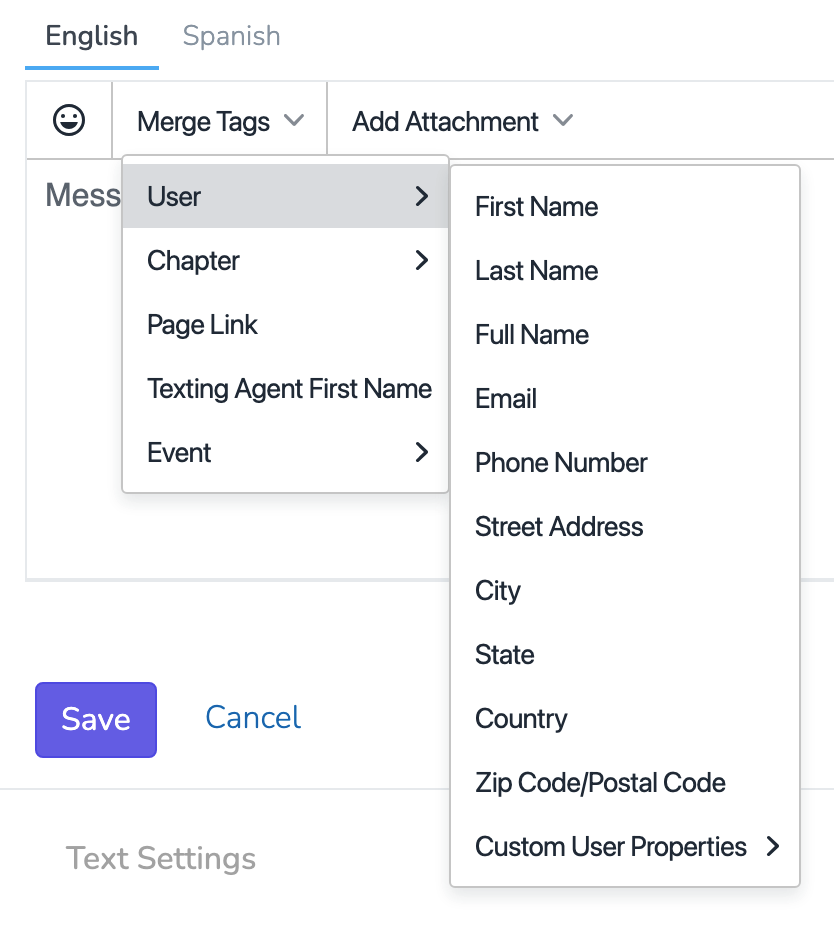
Common Merge Tags
Person Tags
| Tag | Output |
|---|---|
{{ user.first-name }} | Person's first name |
{{ user.last-name }} | Person's last name |
{{ user.full-name }} | Full name |
{{ user.alternate-name }} | Alternate name |
{{ user.preferred-name }} | Alternate name if set, otherwise first name |
{{ user.email }} | Email address |
{{ user.phone-number }} | Phone number |
{{ user.date-of-birth }} | Date of birth (YYYY-MM-DD) |
{{ user.age }} | Age in whole years |
{{ user.city }} | City |
{{ user.state }} | State |
{{ user.zip-code }} | Zip code |
{{ user.branch }} | Person's branch name (scope-aware) |
{{ user.branches }} | Comma-separated list of all branch names |
{{ user.chapter }} | Person's chapter name (scope-aware) |
{{ user.chapters }} | Comma-separated list of all chapter names |
Scope-Aware Tags:{{ user.branch }}and{{ user.chapter }}automatically show the value relevant to the current context (the Chapter or Organization sending the message). Use{{ user.branches }}or{{ user.chapters }}to show all values.
Formatting{{ user.date-of-birth }}: The tag outputs the raw stored value in YYYY-MM-DD format. To display it as prose (e.g. "March 22, 1985"), use the Liquiddatefilter:{{ user.date-of-birth | date: "%B %-d, %Y" }}. If the Person has no date of birth on file, the tag renders as an empty string — use{{ user.date-of-birth | default: 'not provided' }}to supply a fallback.
Agent Tags
| Tag | Output |
|---|---|
{{ agent.first-name }} | Sending team member's first name |
Organization Tags
| Tag | Output |
|---|---|
{{ organization.name }} | Your top-level organization's name |
About{{ organization.name }}: This tag always resolves to your top-level (root) organization, regardless of which sub-organization or chapter owns the page or message. If you have multiple sub-organizations or chapters with their own branding and want the receipt or confirmation to show the specific sub-org name, use the context-specific tag instead. For donation receipts, that's{{ donation-charge.recipient }}(see below).
Donation Tags
| Tag | Output |
|---|---|
{{ user.total-donated }} | Total lifetime donations |
{{ user.most-recent-donation }} | Most recent donation amount |
Donation Receipt Tags
These tags are available in the Donation Receipt, Donation Refunded, and related donation system emails (Settings > System Emails). They resolve from the actual donation charge.
| Tag | Output |
|---|---|
{{ donation-charge.recipient }} | The name of the organization or chapter that received the donation, taken from the Stripe payout account(s) on the donation page. For pages with multiple Stripe payouts, names are joined with " & ". |
{{ donation-charge.amount }} | The charged amount with currency symbol (e.g. $25.00) |
{{ donation-charge.date }} | The charge date (e.g. May 02, 2026) |
{{ donation-charge.receipt-number }} | The receipt number (e.g. #D193-67BF) |
{{ donation-charge.receipt-url }} | A public URL to view the receipt in the browser |
{{ donation-charge.type }} | Either One-Time or Recurring |
{{ donation-charge.card.brand }} | The card brand (e.g. Visa) |
{{ donation-charge.card.last4 }} | The last four digits of the card |
Recommended for receipt subjects: Use{{ donation-charge.recipient }}(not{{ organization.name }}) in the Donation Receipt subject line. Therecipienttag automatically shows the specific sub-organization or chapter that received the donation, which is what most organizations with multiple Stripe accounts or sub-orgs want. For organizations with a single Stripe account scoped to the root organization, both tags render the same value.
Email Wrapper Tags
These tags are available in email wrappers (Settings → Email Wrappers) and in email content that renders inside a wrapper. Note that unlike most merge tags, these use underscores rather than hyphens.
Social media URLs come from your Social Media settings. Emails sent from a sub-organization or chapter use that scope's social media settings first, then fall back to the wrapper's scope, then to the root organization.
| Tag | Output |
|---|---|
{{ organization.twitter_url }} | X (Twitter) URL from Social Media settings |
{{ organization.facebook_url }} | Facebook URL |
{{ organization.instagram_url }} | Instagram URL |
{{ organization.tiktok_url }} | TikTok URL |
{{ organization.youtube_url }} | YouTube URL |
{{ organization.bluesky_url }} | Bluesky URL |
{{ organization.mastodon_url }} | Mastodon URL |
{{ organization.threads_url }} | Threads URL |
{{ organization.upscrolled_url }} | Upscrolled URL |
{{ organization.image_url }} | Organization logo image URL |
{{ organization.mailing_address }} | Organization mailing address |
{{ unsubscribe_url }} | Personalized unsubscribe link for the recipient |
{{ wrapper_header_image_url }} | The wrapper's custom header image URL |
{{ wrapper_footer_image_url }} | The wrapper's custom footer image URL |
Matching icon images are available for building social link rows. {{ social_icons.<network> }} returns a black icon URL (for light backgrounds) and {{ social_icons_white.<network> }} returns a white icon URL (for dark backgrounds). Available networks: twitter, facebook, instagram, tiktok, youtube, threads, bluesky, mastodon, upscrolled.
{% if organization.instagram_url %}
  <a href="{{ organization.instagram_url }}"><img src="{{ social_icons.instagram }}" width="24" /></a>
{% endif %}
Email wrappers only: Social media URL and icon tags are only available in email rendering. On public pages, social media links are placed by the website's theme settings, not by Liquid merge tags.
Additional merge tags are available depending on the context - the editor will show you everything available.
Using Default Values
If a Person doesn't have a value for a field, you can provide a fallback using the default filter:
Hi {{ user.first-name | default: 'friend' }}, welcome!This outputs "Hi friend, welcome!" if no first name is available.
Page Link Merge Tags
Page link merge tags generate personalized URLs that automatically recognize the Person when they click through. This is one of the most powerful features for reducing friction and preventing duplicate records.
Why Use Page Links?
When you send a link like {{ action-page.your-page-slug }}:
- The Person is automatically recognized when they arrive
- Form fields configured as "hide if not blank" won't be shown again
- You avoid duplicate records from re-entered phone numbers or emails
- The experience is cleaner and faster
Always use page link merge tags when sending links to your Pages via email or text.
Example
Instead of:
Sign up here: https://myorg.solidarity.tech/joinUse:
Sign up here: {{ action-page.join }}The recipient gets a personalized link that recognizes them automatically.
Context-Specific Tags
Some merge tags are only available in certain contexts:
Event Automations include tags like:
{{ event.title }}- Event name{{ event-session.start-time }}- Session start time{{ event-session.location-address }}- Event location{{ event-session.confirm-rsvp-url }}- Personalized link to confirm attendance{{ event-session.cancel-rsvp-url }}- Personalized link to cancel an RSVP{{ event-session.add-to-calendar-url }}- Personalized link to add the event to a calendar app
Custom User Properties you've created are also available as merge tags. The dashboard editor shows all available options for your context.
Advanced: Referrals Loop
For power users familiar with Liquid templating, you can iterate over a Person's referrals in email and text blasts. This is useful for sending recruiters a personalized list of everyone they've referred.
Template Pattern
{% for referral in referrals %}
{{ referral.first-name }} {{ referral.last-name }}{% if referral.submitted-action-page.name %} - signed up for {{ referral.submitted-action-page.name }}{% endif %}
{% endfor %}
Available Fields
| Field | Description |
|---|---|
{{ referral.first-name }} | Referral's first name |
{{ referral.last-name }} | Referral's last name |
{{ referral.full-name }} | Referral's full name |
{{ referral.email }} | Referral's email |
{{ referral.phone-number }} | Referral's phone number |
{{ referral.submitted-action-page.name }} | Name of the page they signed up through (if applicable) |
{{ referrals.size }} | Total number of referrals |
Example Use Case
Send an email to recruiters showing their referral activity:
Hi {{ user.first-name }},

Thanks for spreading the word! You've referred {{ referrals.size }} people:

{% for referral in referrals %}
• {{ referral.first-name }} {{ referral.last-name }}{% if referral.submitted-action-page.name %} ({{ referral.submitted-action-page.name }}){% endif %}
{% endfor %}

Keep sharing!
Limit: Returns the 500 most recent referrals. For users with more than 500 referrals, use the API for complete data access with pagination.
Updated about 1 month ago