
Text Keywords
Text Keywords are words that your supporters can text to your Chapter Phone Numbers in order to be immediately added to your list. By default, anyone can text JOIN to your numbers and have a Person record created for them automatically. You can configure a text keyword response to be sent in reply to all valid messages.
New Text Keywords can be added from the Settings tab in the dashboard.
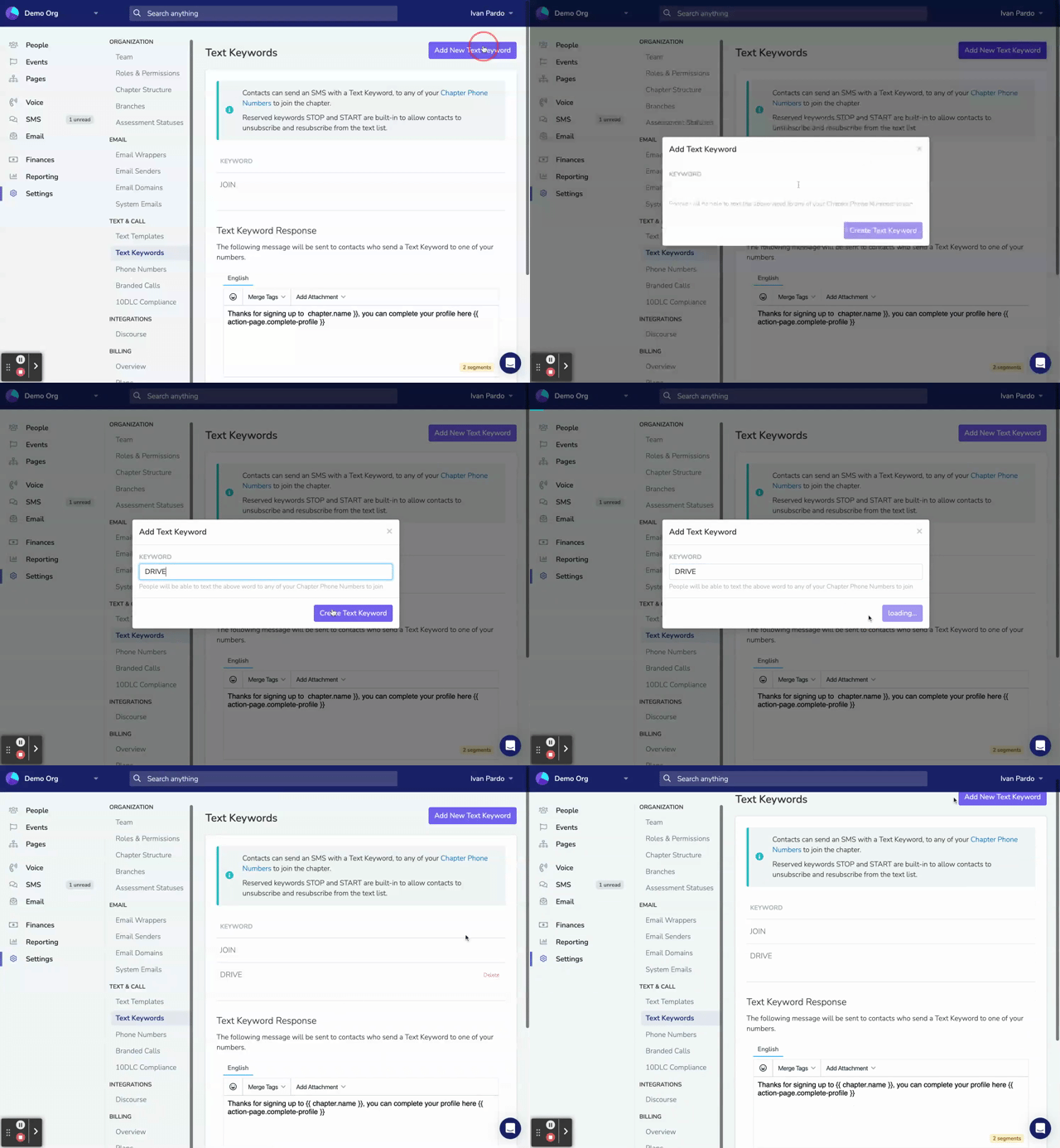
Text Keyword Response
When someone texts a valid keyword to one of your Chapter Phone Numbers, they receive an automatic reply. This response is configured per-chapter, so each chapter in your organization can have its own customized message.
Default Response
New chapters are automatically created with a default text keyword response:
Welcome to {{ chapter.name }}!This ensures that even before you customize the response, supporters texting your keywords will receive a friendly welcome message with your chapter's name.
Customizing the Response
To customize the text keyword response:
- Go to Settings → Text Keywords
- If your organization has multiple chapters, select the chapter from the dropdown
- Edit the response message in the text editor
- Click Save Response
It's a good idea to include a link to a Page using a Merge Tag where the supporter can provide more information like their name and email address, to supplement their phone number.
Example Response
Welcome to {{ chapter.name }}! Thanks for joining.

Complete your profile here: {{ action-page.join-form }}
Available Merge Tags
You can personalize text keyword responses using these merge tags:
| Tag | Output |
|---|---|
{{ chapter.name }} | The chapter's name |
{{ chapter.city }} | The chapter's city |
{{ chapter.phone-number }} | The chapter's phone number |
{{ organization.name }} | Your organization's name |
{{ user.first-name }} | The person's first name (if known) |
{{ action-page.your-slug }} | Personalized link to a page |
Use the Merge Tags dropdown in the text editor to see all available options.
Multi-Chapter Organizations
For organizations with multiple chapters, text keyword responses work on a per-chapter basis:
- Each chapter has its own response - When someone texts to Chapter A's phone number, they receive Chapter A's configured response
- Automatic chapter assignment - The person is added to the chapter whose phone number they texted
- Existing contacts - If someone who already exists in your organization texts a keyword to a different chapter's number, they are automatically added to that chapter as well (supporting multi-chapter membership)
This means the same keyword (like "JOIN") can be used across all your chapters, with each chapter providing its own customized welcome experience.
Best Practices
- Include a page link - Add
{{ action-page.join-form }}to collect additional information like name and email - Keep it short - Text messages have a 160 character limit per segment; longer messages may be split
- Use the chapter name -
{{ chapter.name }}helps supporters confirm they've reached the right chapter - Test your response - Text your own keyword to verify the message looks correct
Updated 9 months ago