
Filters & Lists
Filters help you find the right people in your database. You can filter by person properties, past activities, communication history, and more. Save any filter as a List to reuse it later or share it with your team.
Note: The examples below highlight some commonly used filters. The product includes many more filter options - explore the filter builder to see everything available.
Building a Filter
Click "Show Filter" from the People section to open the filter builder.
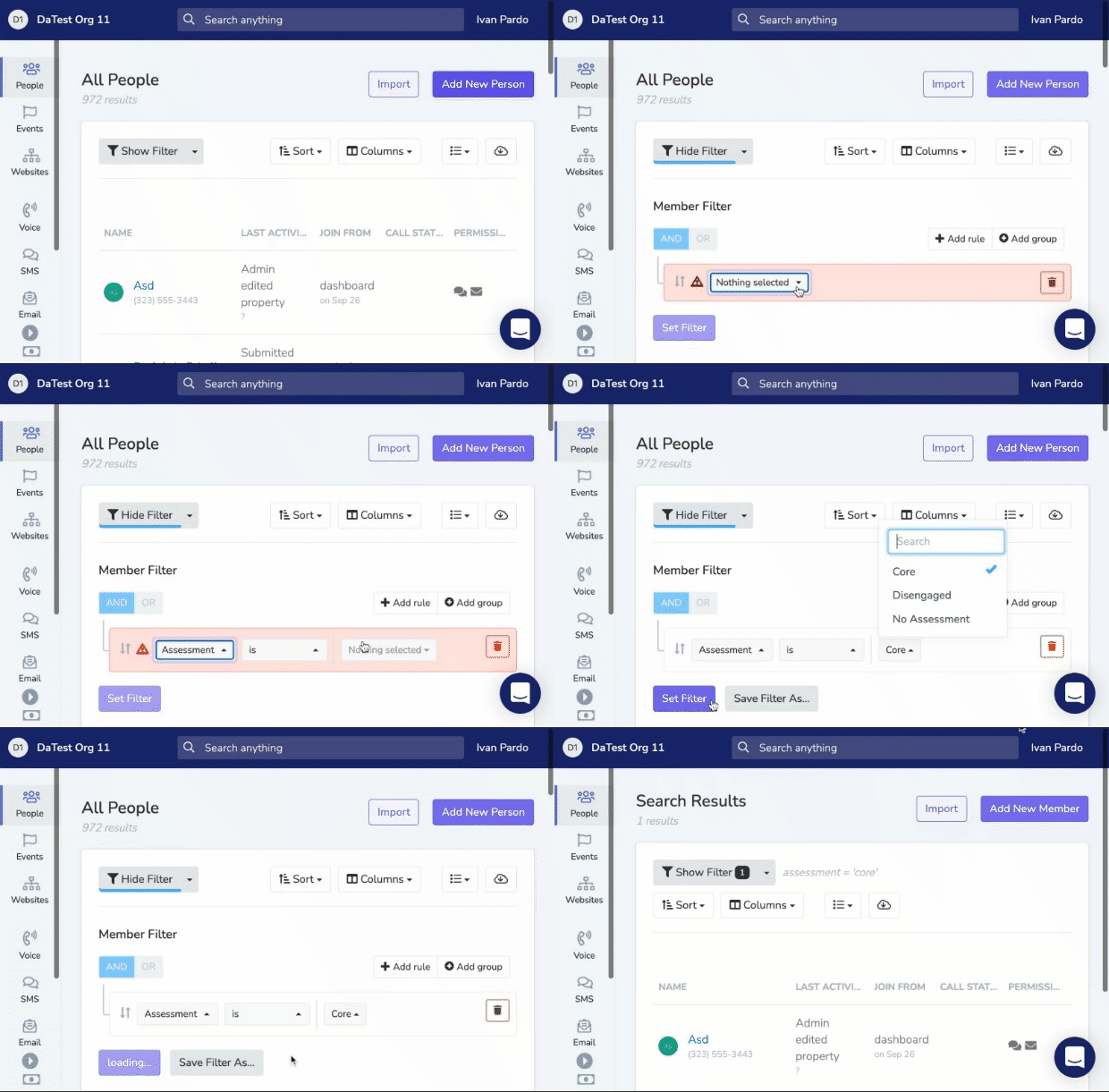
Each filter rule has three parts:
- Field - What you're filtering on (e.g., Assessment, Chapter, Event Attendance)
- Operator - How to match (e.g., "is", "includes", "is not")
- Value - What to match against
Filter Categories
Person Properties
Filter by data stored on the person record.
| Field | Example Use |
|---|---|
| Assessment | Find everyone assessed as "Core" or "Developing Leader" |
| Preferred Language | Find Spanish-speaking members |
| Chapter | Find people in specific chapters |
| Custom Properties | Filter by any custom field you've created |
| Tags | Find people with specific tags |
| Alternate Name | Find people by their alternate name |
| Date of Birth | Find people born on, before, after, or between specific dates |
| Age | Find people by current age |
Activity & Engagement
Filter by what people have done.
| Field | Example Use |
|---|---|
| Submitted Form | Find people who signed a specific petition |
| RSVP'd to Event | Find people who RSVP'd "Yes" to an event |
| Attended Event | Find people who actually showed up |
| Made a Donation | Find donors within a date range |
Communication History
Filter by calls, texts, and emails.
| Field | Example Use |
|---|---|
| Have We Spoken | Find people you've never had a conversation with |
| Received Text | Find people who got a specific text blast |
| Opened Email | Find people who opened a specific email |
| Textbank Reply AI Category | Find people whose textbank reply was categorized into a specific AI category (requires AI Reply Analysis to have been run) |
Membership & Dues
Filter by financial status.
| Field | Example Use |
|---|---|
| Is Dues Payer | Find all active dues-paying members |
| Dues Expiring | Find members whose dues expire within 30 days |
| Total Donated | Find people who've donated above a threshold |
Date Ranges
Many filters support date ranges. You can use:
- Fixed dates: January 1, 2024 to March 31, 2024
- Dynamic ranges: "Last 7 Days", "This Month", "Past Week"
Dynamic ranges recalculate automatically, so a saved list using "Last 30 Days" always shows recent activity.
Combining Filters (AND/OR)
By default, multiple rules are combined with AND (all conditions must match).
Click "Add Group" to create OR logic. Rules within a group are AND'd together, and groups are OR'd.
Example: Find Core members OR anyone who donated over $100:
Group 1: Assessment includes "Core"
OR
Group 2: Total Donated is greater than "100"
Using Other Lists
You can filter by membership in another list. This lets you build complex, nested queries.
Example: Find people in your "Event Volunteers" list who haven't been contacted this month:
In List includes "Event Volunteers"
AND Last Contacted is before "This Month"
Saving a Filter as a List
Click "Save as List" to save your filter for reuse.
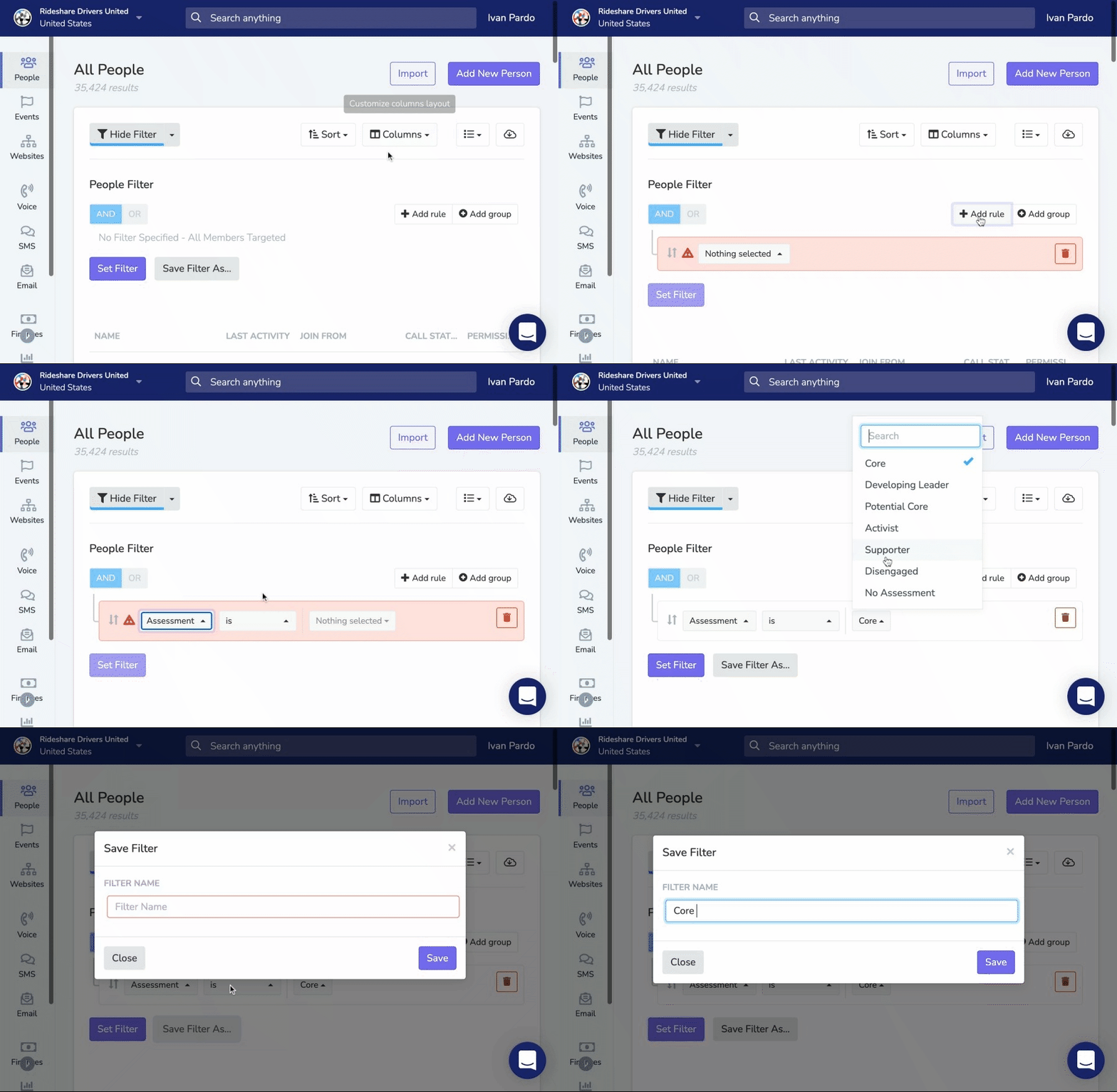
Saved lists are shared across your organization. Team members can access them from the Lists dropdown or the Lists page.
Adding a Description
When creating or editing a list, you can add an optional Description to explain what the list is for. The description appears under the list name on the Lists page, so anyone with access can see at a glance what it's for.
Default Column Layout
You can save a default column layout that everyone sees when they open the list. From the People tab with the list selected, open the Columns dropdown, pick the columns you want, check Save as default layout for this list, and click Apply. Requires edit access to the list.
Organizing Saved Lists with Folders
You can organize active saved lists into folders on the Lists page. Folders help you group related lists and keep frequently used lists easier to find.
Creating a Folder
On the Lists page, click New Folder. Enter a folder name, choose the folder scope, and create the folder.
The folder scope controls which lists can be placed inside it:
- Chapter scoped folders can only contain lists from that chapter
- Organization scoped folders can contain organization lists and lists from chapters within that organization
If you later change a folder's scope and some lists no longer match that scope, those lists are automatically moved back to Other Lists (Root).
Moving a List into a Folder
Open the ... menu next to any list and choose Move to Folder or Move List. Select the destination folder, or choose Other Lists (Root) to remove the list from a folder.
Reordering Folders and Lists
You can drag and drop both folders and active lists using the grip handle on the left side of each row. Lists can be reordered within a folder, between folders, or back to the root level.
Editing or Deleting a Folder
Open the ... menu next to a folder to rename it, change its scope, or delete it. If you delete a folder, the lists inside it move back to Other Lists (Root).
Archived Lists
Archived lists stay in the separate Archived tab. Only active lists appear in the folder tree.
Common Filter Examples
New signups this week
Created At is within "Last 7 Days"Members to follow up with
Assessment includes "Potential Core", "Developing Leader"
AND Have We Spoken is "No"
High-value donors
Total Donated is greater than "500"
AND Is Dues Payer is "Yes"
Re-engagement targets
Last Activity is before "Past Month"
AND Assessment is not "Lost"
Updated 4 months ago